
Wayfair - Shop All Things Home
Wayfair, LLCShopping
4.839.93K Reviews
- Version
- 7.43.0
- Installs
- 10.00M
- Age Rating
- Everyone
Screenshots



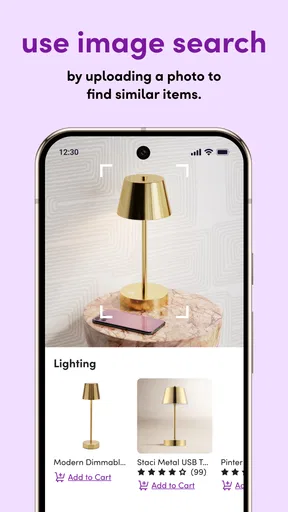
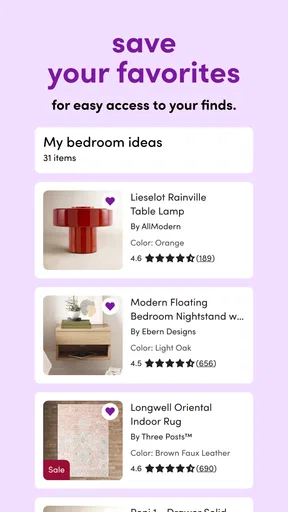



Our Review of Wayfair - Shop All Things Home
 Analysis by Appyee
If you are furnishing a room, replacing one tired piece of furniture, or simply trying to make a home feel more finished, Wayfair is the kind of shopping app I would open before visiting several separate stores. It brings furniture, décor, and design inspiration into one mobile experience, but its large catalog can feel both helpful and overwhelming. My advice is to approach it with a clear room, budget, and shortlist in mind rather than browsing without a plan.
Wayfair is a free shopping app from Wayfair, LLC for everyone, and it is available on Android and iOS. It has been around since February 20, 2015, and its current version is 7.32.0 for devices running OS 10 or later. The app has earned a 4.8 average from around 461 thousand ratings, with more than 10 million installs, so it is clearly used by a large number of home shoppers.
What to expect when you open the app
The first thing I noticed is that this is not just a digital furniture showroom. It is closer to a very large home marketplace, where the useful part is finding a manageable path through the selection. You can look for sofas, beds, tables, lighting, storage, rugs, wall décor, and smaller finishing touches without switching between different retailers.
That breadth is its biggest strength and its first challenge. A search for something as simple as a bedside table can produce many styles, colors, and variations. If you already know the approximate look you want, this makes comparison convenient. If you are undecided, the number of choices can slow you down instead of helping you decide.
I found the app most useful when I treated it as a planning tool rather than a place to make an impulsive purchase. I would begin with the room and the problem I wanted to solve: adding hidden storage, filling an empty corner, replacing a dining chair, or making a rental feel more personal. That small change in mindset makes the catalog easier to use.
The design and décor side is also valuable for people who do not have a complete plan. Browsing related home items can help you notice combinations you might not have searched for directly. A neutral rug, a compact lamp, and a small side table may give you a better starting point than searching for “make my living room nicer” and hoping the app does all the thinking.
Still, I would not assume that every attractive product is automatically suitable for your space. Product photographs can make furniture look more substantial or more compact than it feels in person. Before becoming attached to an item, I recommend checking its listed dimensions, materials, color description, and any available customer feedback carefully.
Who will get the most from it
This app suits first-time renters, homeowners furnishing a new room, parents looking for practical storage, and anyone who wants to compare many home styles from a phone. It is especially convenient when you are trying to coordinate several purchases instead of finding one isolated item.
It is less suitable if you need to sit on a sofa before buying it, inspect wood or fabric under natural light, or speak with a specialist about a complicated renovation. A local furniture store may be better for tactile decisions, while a specialist retailer can be more useful when you need a narrow product range and detailed technical guidance.
Getting started without feeling lost
After installing the app, I would avoid immediately scrolling through the home page for too long. Start by deciding whether you are shopping for a room, a furniture type, or a decorative detail. For example, “small entryway storage” is a more useful starting point than “new home.” A focused phrase gives the app a chance to show relevant products instead of a huge mixture of possibilities.
If you are buying for a particular space, keep a note on your phone with the available width, depth, and height. Include the distance needed to open doors, drawers, or reclining parts. This is one of the simplest ways to prevent a visually appealing purchase from becoming an awkward fit. I also measure hallways, stair turns, and door openings when the item is large; a product can fit the room and still fail to reach it.
Use your phone’s notes app to record the exact requirements before browsing. For a desk, I might write down the maximum width, whether cable space matters, and whether I need drawers. For a rug, I would note the seating arrangement and the amount of floor I want visible around it. These details make the search less emotional and help me reject unsuitable products quickly.
It is also worth deciding what you are willing to compromise on. Perhaps the color is flexible but the dimensions are not, or perhaps style matters more than storage capacity. Online furniture shopping becomes much easier when you identify one or two non-negotiable requirements and leave the rest open.
How I make the first search productive
I usually begin with a broad product type, then narrow it using the available browsing controls and product details. I do not rely on the first row of results. Instead, I open several plausible choices and compare them in the same order: dimensions, construction or material information, color, customer comments, and the practical details that affect daily use.
For décor, I pay attention to whether the listed color will work with my existing items rather than trying to recreate an entire room from a single image. A lamp can look perfect in a staged photograph but be too tall for a sideboard. A wall decoration can suit the style of a room while being the wrong scale for the wall. The app gives you many ideas, but the final judgment still belongs to you.
One useful habit is to save a small group of candidates instead of leaving many product pages open. I then compare only the strongest options. This reduces the common problem of remembering a product visually but forgetting why it seemed suitable. When two items look similar, the practical details usually make the decision clearer.
If you are shopping for a shared home, show the shortlist to the other person before moving forward. This is more efficient than sending dozens of individual products. It also exposes disagreements early, especially when one person prioritizes appearance and the other cares more about storage, cleaning, or everyday durability.
The first meaningful success: choosing one useful item
For a first successful action, I recommend completing a small, realistic shopping task rather than trying to furnish an entire room in one session. A storage basket, lamp, side table, or set of decorative pieces is easier to evaluate than a complete sofa-and-rug combination. The goal is to learn how the app fits your decision process while solving a real home problem.
Imagine that I have just moved into an apartment and the entrance has become a pile of shoes, keys, and bags. I would search for entryway storage, measure the available wall, and decide whether I need open shelves or concealed storage. I would then compare a few options, check whether the dimensions leave enough walking space, read the practical comments, and save the best candidate before deciding.
That workflow matters because it separates inspiration from commitment. I can enjoy browsing, but I do not confuse an appealing room image with proof that a particular item will work in my home. The first meaningful success is not simply placing something in a cart; it is reaching a choice I can explain: this item fits the space, meets the main need, and makes sense beside what I already own.
For a larger purchase, I would use the same process in stages. First choose the function, then the size, then the style, and only after that compare the finer details. Starting with color alone often leads to attractive but impractical results. Starting with function gives the rest of the decision a stronger foundation.
I also recommend looking at customer feedback with a specific question in mind. Instead of reading every comment passively, search for clues about assembly, comfort, sturdiness, color accuracy, or cleaning. The most helpful review is the one that answers your concern, not necessarily the one with the strongest emotion.
A practical way to judge value
Because the app contains products across many home categories, “good value” will not mean the same thing for every purchase. For a decorative object, appearance and scale may dominate. For a bed frame or dining chair, stability and long-term comfort matter more. I would never compare two items only by their displayed price; compare what each one actually provides for your room and routine.
Think about maintenance before buying. Light upholstery, textured surfaces, open shelving, and delicate finishes can look excellent but demand more care. If you have pets, young children, or limited time for cleaning, a slightly less dramatic design may be the better choice. This is an important trade-off that product photos rarely communicate clearly.
For a first purchase, I would also avoid buying several pieces that depend on one another unless the measurements and style are already settled. It is safer to confirm that one item works in the room before building around it. This is particularly useful for small spaces, where one wrong purchase can make the entire layout feel crowded.
Where new users commonly get confused
The biggest source of friction is the sheer range of options. Similar names can describe products with different sizes, finishes, or configurations, so I read the full product information instead of assuming that the photograph represents every available version. If a product has selectable choices, I check which choice is active before continuing.
Another common mistake is treating a room photograph as a precise color reference. Screens vary, lighting changes the appearance of finishes, and a staged room may contain several coordinated elements that are not part of the item being viewed. I use images for style and shape, then rely on the written details for the decision.
Dimensions deserve special attention. I have found that shoppers often measure the empty area but forget the space needed to walk around furniture or open a door. For a cabinet, I would consider the swing of the doors and the reach needed to use the shelves. For a chair, I would consider how far it moves when someone sits down. For a rug, I would think about whether furniture legs should sit on it or remain outside it.
Assembly is another area where expectations can differ. A product that looks simple may still require time, patience, and enough floor space to put together. I would read comments for repeated patterns rather than relying on one unusually positive or negative experience. If you dislike assembling furniture, that should influence your choice as much as the appearance.
It is also easy to lose track of why you saved something. When I create a shortlist, I add a brief note such as “fits beside the window” or “best storage capacity.” That turns a collection of attractive products into a genuine comparison. Without those notes, browsing can become an endless loop of revisiting the same choices.
When the app is not the best tool
If your purchase depends on exact color matching, I would use the app for research and then verify the finish in person whenever possible. The same applies to sofas, mattresses, and chairs where comfort is personal. Online information can narrow the field, but it cannot replace your own physical judgment for every category.
I would also choose another route if you need a highly customized piece, immediate local pickup, or advice about fitting furniture into a difficult architectural space. A nearby specialist may offer a narrower selection but more direct help. The strength here is breadth and convenience, not necessarily personal consultation or instant certainty.
Finally, people who become stressed by too many choices should set a stopping rule. For example, compare a small number of serious candidates, eliminate anything that fails a non-negotiable requirement, and make the decision from the remaining group. More browsing does not always produce a better result; sometimes it only makes a reasonable choice feel doubtful.
Using it more effectively after the first purchase
Once I know how I want to browse, I use the app for complete-room planning in a more deliberate sequence. I start with the largest functional item, then work around it with pieces that solve smaller problems. In a bedroom, that might mean deciding on the bed and storage first, followed by lighting and décor. In a living room, seating and walking paths come before accent pieces.
This order prevents a common mistake: buying decorative items that consume the budget or space needed for essential furniture. It also makes style coordination easier because the supporting pieces can respond to the main item rather than competing with it.
Another useful workflow is to shop by problem instead of by trend. “Hide cables,” “create a reading corner,” “organize a narrow bathroom,” and “add seating for guests” are more practical prompts than chasing a broad style label. Style can then guide the final selection without becoming the only criterion.
I would keep a simple record of purchases and intended locations, especially when several rooms are involved. This helps avoid buying duplicate storage or choosing finishes that clash. It also makes later browsing more focused because you know what the home already has and what still needs attention.
For renters, the app can be particularly helpful when you prioritize movable improvements: lighting, rugs, freestanding storage, mirrors, and small furniture. These can change the feel of a room without depending on permanent alterations. Homeowners may have more freedom, but the same principle applies when testing a new style before making a larger commitment.
What I would tell a friend before downloading
I would say that this is a strong choice if you want one place to explore furniture and décor, compare styles, and turn a vague room idea into a shortlist. The free price makes it easy to try, and the Everyone age rating means it is broadly accessible for household shopping.
I would also warn my friend not to confuse convenience with certainty. The app can help you discover and compare, but you still need to measure, check the details, think about maintenance, and decide whether the item suits your actual routine. Its catalog is an advantage only when you give yourself a method for narrowing it.
For someone furnishing a first apartment, I would begin with one room and one practical goal. Save a few candidates, compare them with measurements in front of you, and make the first purchase only after you can explain why it fits. That approach makes the experience reassuring rather than overwhelming.
My final view is that Wayfair works best as a thoughtful home-shopping companion, not as a replacement for every kind of furniture buying. The app is convenient, broad, and useful for turning inspiration into concrete options. Its main weakness is the effort required to filter those options responsibly. If you are willing to slow down at the important moments, it can save browsing time and help you make a more confident choice for your home.
Privacy and Permissions
See what permissions an app requests and how it handles your data.
- Location
- approximate location (network-based), precise location (GPS and network-based)
- Camera
- take pictures and videos
- Wi-Fi connection information
- view Wi-Fi connections
- Other
- view network connections, full network access, run at startup, reorder running apps, control vibration, prevent device from sleeping, read Google service configuration
Verdict
Strengths of Wayfair - Shop All Things Home
- Wide selection of furniture, décor, lighting, and home essentials
- Frequent sales, coupons, and seasonal promotions can reduce prices
- Detailed product photos and customer reviews help with comparisons
- Room-planning tools and visual features support decorating decisions
- Multiple delivery options are available for many products
Limitations of Wayfair - Shop All Things Home
- Large catalog can make finding the right item feel overwhelming
- Furniture quality and color may vary between different third-party brands
- Assembly is often required for larger furniture purchases
- Shipping costs and delivery times can differ significantly by item
- Returns for oversized products may involve restrictions or extra fees
Similar Picks in This Category
View All
SHEIN-Shopping Online
Roadget Business PTE. LTD.4.8

Amazon Shopping
Amazon Mobile LLC4.4


Mercado Libre: Compras online
Mercado Libre4.8

Wish: Shop and Save
Wish US Holdings LLC4.7

Alibaba.com - B2B marketplace
Alibaba Mobile4.4
Frequently Asked Questions
What is Wayfair - Shop All Things Home?
Wayfair is an online shopping app focused on furniture, home décor, appliances, lighting, rugs, mattresses, kitchen products, and other household essentials. After browsing the app, users can search by category, room, style, brand, price, or customer rating. It is designed for people furnishing an entire home as well as shoppers looking for individual items or seasonal decorations.
Can I find furniture and home products for different budgets on Wayfair?
Yes. Wayfair offers products across a broad range of prices, from affordable accessories and small furnishings to higher-priced sofas, bedroom sets, appliances, and outdoor items. The app includes sorting and filtering tools that help narrow results by price, material, color, dimensions, rating, and availability. However, prices and promotions can change, so checking the final listing details is recommended.
Does the Wayfair app provide product reviews and useful shopping information?
Most product listings include customer ratings, written reviews, photographs, dimensions, material details, color options, delivery estimates, and return information. This makes it easier to compare products before ordering, especially when buying furniture online. Even so, shoppers should read several reviews rather than relying only on the average rating, because assembly, size, comfort, and color impressions can vary between customers.
How does delivery and ordering work in the Wayfair app?
Users can add products to a shopping cart, enter a delivery address, select available shipping options, and review the estimated arrival date before completing payment. Delivery details may differ depending on the seller, product size, location, and stock status. Large furniture can require special handling or scheduled delivery, so buyers should review shipping charges, delivery instructions, and estimated dates carefully.
What should I know about returns and customer support before downloading Wayfair?
Wayfair provides order management and customer-support features through its app and website, allowing users to track purchases, view order details, and request help when needed. Return eligibility, deadlines, fees, exclusions, and pickup arrangements can vary by product and order. Before buying large or customized items, it is especially important to read the current return policy and confirm whether the product can be returned.
